
Learners4U Support
When you get stuck, or feel that anything might not be working do not hesitate to contact us
Support & Frequently Asked Questions
- SUPORT - For any support please feel free to contact us on 081 565 1000 or send a mail to support@namcloud.com
- If possible , please view the FAQ below as it MIGHT have answers of your query.
- WHAT DO I NEED TO INSTALL LEARNERS4U ON MY COMPUTER?- When you are done downloading and installing the program you will need internet connection to activate it. Once its activated you don’t need any internet connection. Technical requirements are: OS: Windows®XP (SP 3) / Vista (SP 2) / 7 (SP 1)/8 Processor: Pentium® III 600 MHz (1 GHz for Windows® Vista or 7) or equivalent Memory: 1GB Hard Drive Space: 300 MB Graphics card: DirectX 9 compatible, 1024x768 24-bit (or higher) Graphics memory: 512 MB Printer: Optional (Printing reports) Internet: Optional (Required for product registration)
- DOES THE LEARNERS4U GENUINELY COVER ALL I NEED TO PASS THE NATIS LEARNERS LICENCE TEST?- - Yes. Within the Learners4U program you'll find a lot of material that is designed to make the learning process simple and relevant. This program emphasises on making it easy for you to understand the concepts surrounding the test and the questions that are being asked. So when pursuing a learners licence for the motorcycle, Light motor vehicle or the Heavy motor vehicle category, we recommend the Learners4U product for you.
- CAN I COPY THE DOWNLOADED PRODUCT TO ANOTHER COMPUTER ? - Yes, you can copy the downloaded file as it is from the website and then install it to as many another computers as you like. It will still require a serial number which you can purchase as explained on the activation page.
- WHAT’S NEXT, AFTER LEARNERS4U? - When done going through (studying) the Learners4U product you should book yourself in at your nearest NATIS learner licence testing centres. When done with the testing you should continue going to the next step which is getting your drivers licence. NamCloud also offer driving lessons that you can do to get your drivers licence
- HOW OFTEN IS THE LEARNERS4U UPDATED? -The Learners4U are always updated every 2nd month. But this updates are only for advertisements and special campaigns. Major updates on the actual content is done every 6 months.
- CAN I GET THE LEARNERS4U APPLICATION WITHOUT INTERNET? - Yes, at the office with a USB, for N$ 100.00. From our office, including Online 10x Mock tests
- WHAT HAPPENS WHEN MY 60 DAYS EXPIRES ? - It will automatically request for a serial number when the 60 day periods expires. Which will be the activation screen. From there you can again purchase a new serial number and activate.
- WHAT IF I DON’T HAVE INTERNET CONNECTION ? - For computers without internet connection, it will be possible to activate. To activate without internet you have to send the L4UE#Acitvation Code#SystemID, which is generated by the computer. This will be charged N$ 10.00 via SMS. Please view the activate page for more information.
- WILL THIS PROGRAM WORK ON MY TABLET ? - Yes, at this moment we have applications for Apple, PC (Windows) and for Android.
How to Activate the App(s)
HOW IT WORKS FOR PC / LAPTOPS
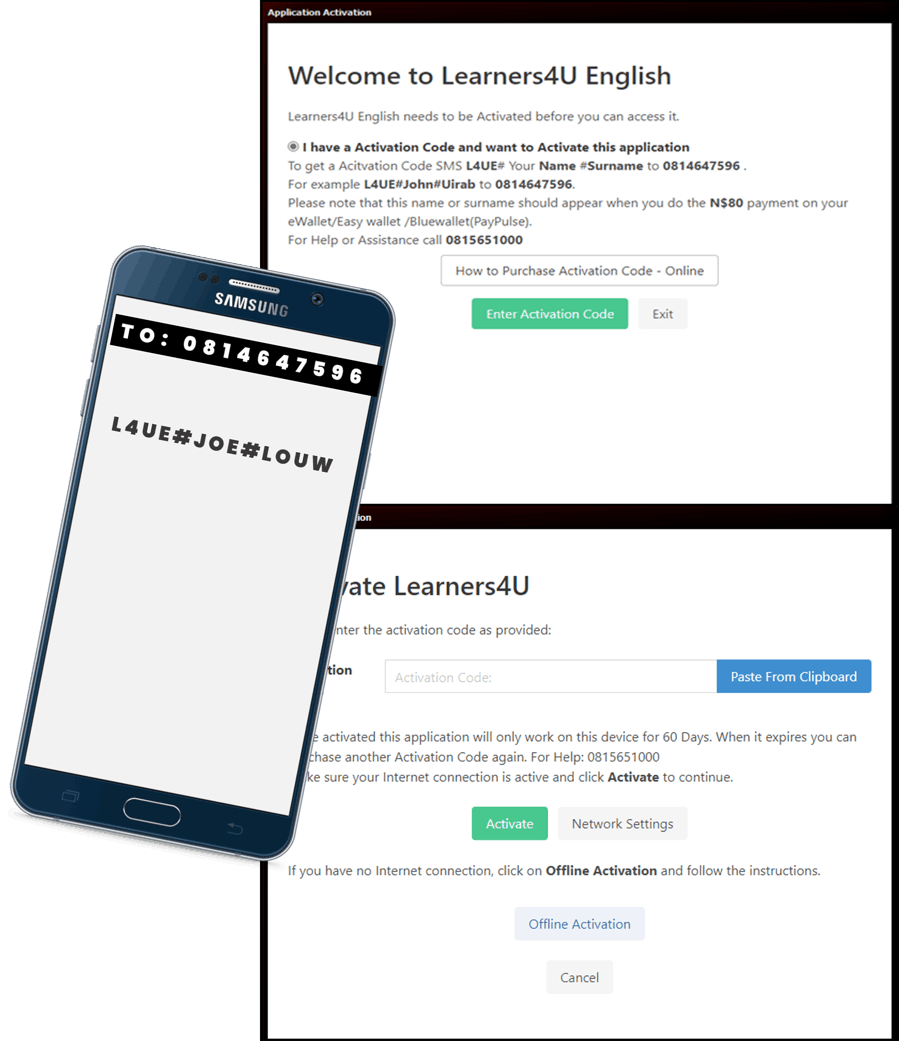
Once you have finished downloading and installing the application, You will come to a screen where you need to sent and SMS.
When you reach this screen, You must compose an SMS structured as the following:
L4UE#Your Name#Your Surname and sent it to 0818191200
Example: L4UE#JOE#LOUW to 0818191200
NOTE: This should be the info that appears at the recipient SMS when sending eWallet/Easy Wallet/Bluewallet.
Once you complete the request, you will receive an SMS from 0818191200 for the N$ 80 Payment
Upon receiving the Payment SMS notification we will sent you the Activation code.
Before Entering the activation code please MAKE SURE THE COMPUTER DATE & TIME IS CORRECT Enter the Activation Code and then Click on Activate.
HOW IT WORKS FOR MOBILE
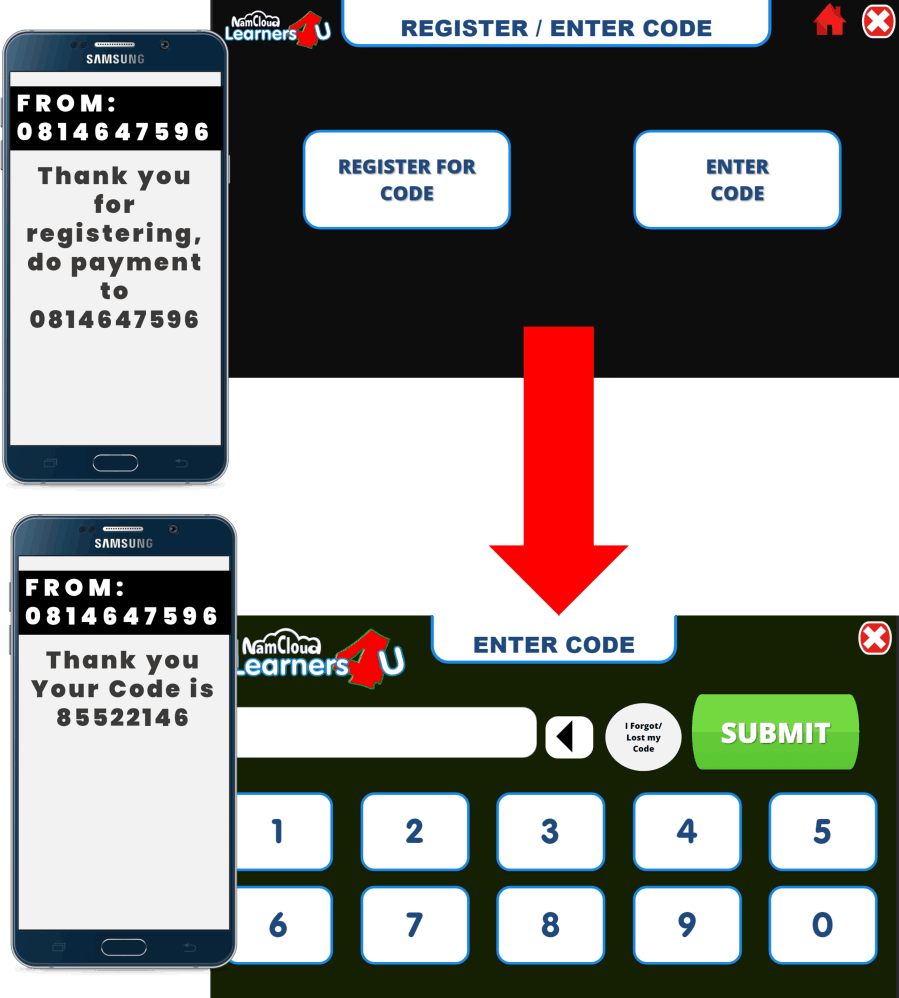
Once you have install the app from Google or Apple playstore and it gets launched. hen you open the modules and its locked, you will come to the registration screen. On the Register/Enter Code screen you can enter the code if you have a code already. If you do not have a code, you need to register. Complete the form as required.
NOTE: This should be the info that appears at the recipient SMS when sending eWallet/Easy Wallet/Bluewallet.
Once you complete the request, you will receive an SMS from 0818191200for the N$ 80 Payment
Upon receiving the Payment SMS notification we will sent you the Activation code.
Learners4U Support
When you get stuck, or feel that anything might not be working do not hesitate to contact us
Support & Frequently Asked Questions
- SUPORT - For any support please feel free to contact us on 081 565 1000 or send a mail to support@namcloud.com
- If possible , please view the FAQ below as it MIGHT have answers of your query.
- WHAT DO I NEED TO INSTALL LEARNERS4U ON MY COMPUTER?- When you are done downloading and installing the program you will need internet connection to activate it. Once its activated you don’t need any internet connection. Technical requirements are: OS: Windows®XP (SP 3) / Vista (SP 2) / 7 (SP 1)/8 Processor: Pentium® III 600 MHz (1 GHz for Windows® Vista or 7) or equivalent Memory: 1GB Hard Drive Space: 300 MB Graphics card: DirectX 9 compatible, 1024x768 24-bit (or higher) Graphics memory: 512 MB Printer: Optional (Printing reports) Internet: Optional (Required for product registration)
- DOES THE LEARNERS4U GENUINELY COVER ALL I NEED TO PASS THE NATIS LEARNERS LICENCE TEST?- - Yes. Within the Learners4U program you'll find a lot of material that is designed to make the learning process simple and relevant. This program emphasises on making it easy for you to understand the concepts surrounding the test and the questions that are being asked. So when pursuing a learners licence for the motorcycle, Light motor vehicle or the Heavy motor vehicle category, we recommend the Learners4U product for you.
- CAN I COPY THE DOWNLOADED PRODUCT TO ANOTHER COMPUTER ? - Yes, you can copy the downloaded file as it is from the website and then install it to as many another computers as you like. It will still require a serial number which you can purchase as explained on the activation page.
- WHAT’S NEXT, AFTER LEARNERS4U? - When done going through (studying) the Learners4U product you should book yourself in at your nearest NATIS learner licence testing centres. When done with the testing you should continue going to the next step which is getting your drivers licence. NamCloud also offer driving lessons that you can do to get your drivers licence
- HOW OFTEN IS THE LEARNERS4U UPDATED? -The Learners4U are always updated every 2nd month. But this updates are only for advertisements and special campaigns. Major updates on the actual content is done every 6 months.
- CAN I GET THE LEARNERS4U APPLICATION WITHOUT INTERNET? - Yes, at the office with a USB, for N$ 100.00. From our office, including Online 10x Mock tests
- WHAT HAPPENS WHEN MY 60 DAYS EXPIRES ? - It will automatically request for a serial number when the 60 day periods expires. Which will be the activation screen. From there you can again purchase a new serial number and activate.
- WHAT IF I DON’T HAVE INTERNET CONNECTION ? - For computers without internet connection, it will be possible to activate. To activate without internet you have to send the L4UE#Acitvation Code#SystemID, which is generated by the computer. This will be charged N$ 10.00 via SMS. Please view the activate page for more information.
- WILL THIS PROGRAM WORK ON MY TABLET ? - Yes, at this moment we have applications for Apple, PC (Windows) and for Android.
How to Activate the App(s)
HOW IT WORKS FOR PC / LAPTOPS
Once you have finished downloading and installing the application, You will come to a screen where you need to sent and SMS.
When you reach this screen, You must compose an SMS structured as the following:
L4UE#Your Name#Your Surname and sent it to 0818191200
Example: L4UE#JOE#LOUW to 0818191200
NOTE: This should be the info that appears at the recipient SMS when sending eWallet/Easy Wallet/Bluewallet.
Once you complete the request, you will receive an SMS from 0818191200 for the N$ 80 Payment
Upon receiving the Payment SMS notification we will sent you the Activation code.
Before Entering the activation code please MAKE SURE THE COMPUTER DATE & TIME IS CORRECT Enter the Activation Code and then Click on Activate.
HOW IT WORKS FOR MOBILE
Once you have install the app from Google or Apple playstore and it gets launched. hen you open the modules and its locked, you will come to the registration screen. On the Register/Enter Code screen you can enter the code if you have a code already. If you do not have a code, you need to register. Complete the form as required.
NOTE: This should be the info that appears at the recipient SMS when sending eWallet/Easy Wallet/Bluewallet.
Once you complete the request, you will receive an SMS from 0818191200for the N$ 80 Payment
Upon receiving the Payment SMS notification we will sent you the Activation code.